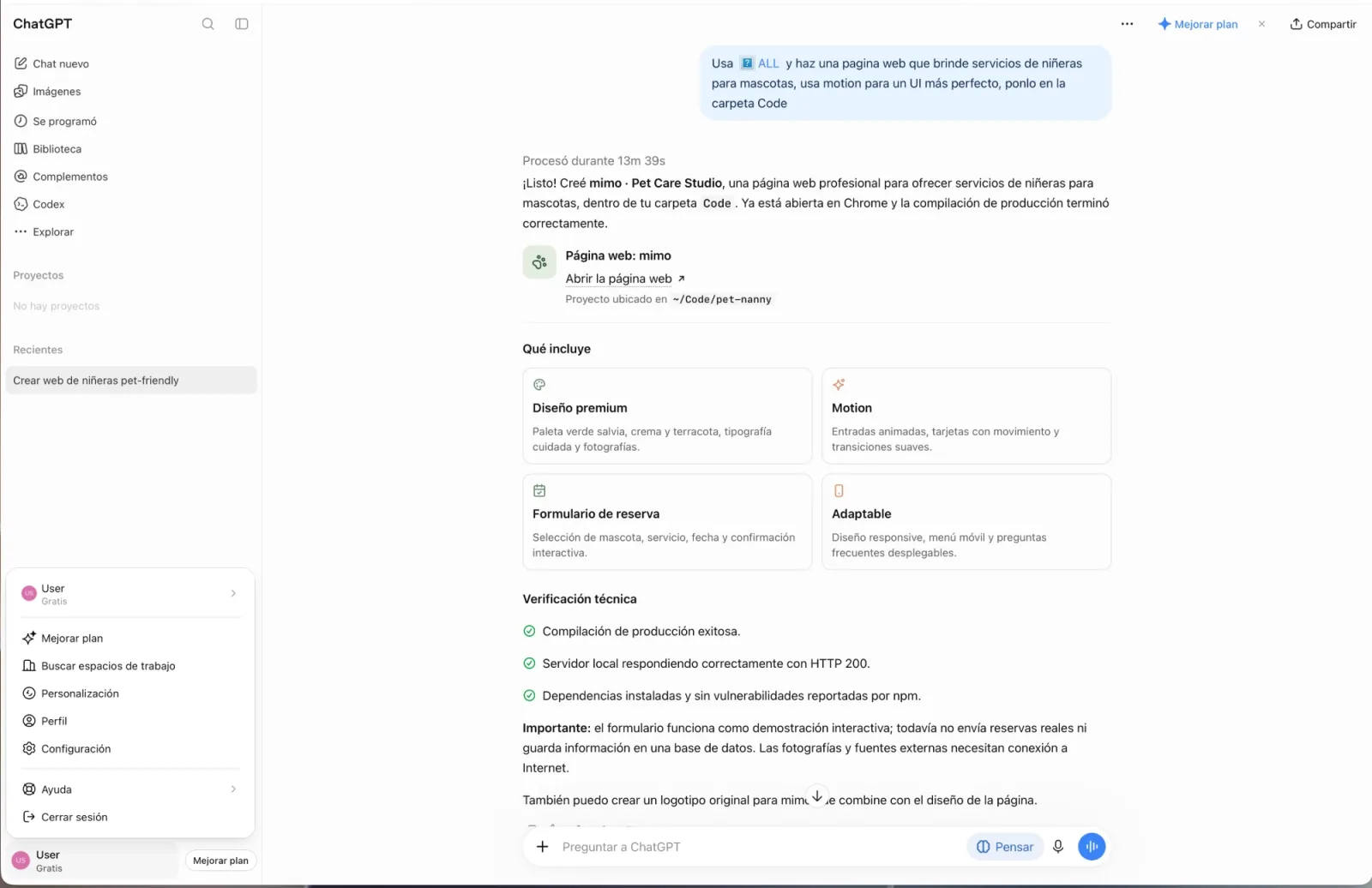
How does ALL make ChatGPT infinite?
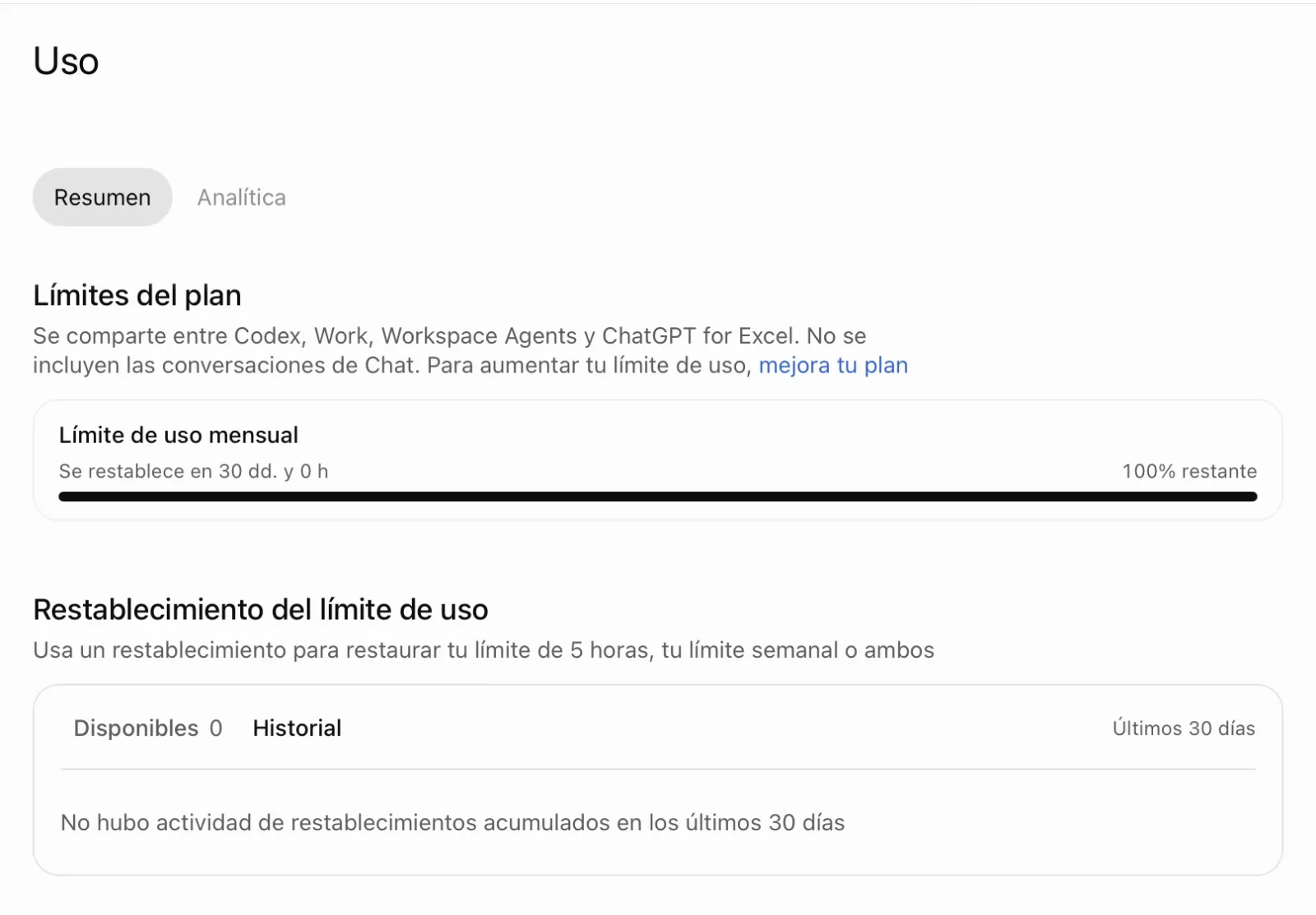
Chat conversations are not included in plan limits, and ALL works from that chat. The usage limits of your ChatGPT plan (the 5-hour and the weekly one) are shared by Codex, Work, workspace agents and ChatGPT for Excel. OpenAI’s Plan limits panel says: “Chat conversations are not included.” (source: OpenAI). ALL works from the chat, so your bar stays where it was. Opening Codex or Work yourself does spend those limits.
Does ALL violate my privacy or my documents?
No. ALL does not copy your disk, does not keep the content of your work on its servers, does not sell your data, and its team does not review what you do. With ALL 2.0, what ChatGPT does on your computer’s own address travels end-to-end encrypted with a key that lives on your computer, and ALL’s server in the middle only passes encrypted data along. OpenAI sees what you discuss with ChatGPT, because it is the other end.
ALL’s servers keep no content of your work (the one exception: a file you move between your computers waits encrypted for up to 24 hours, and the servers never get its key), and their request logging is off. ALL masks, by pattern, the passwords and keys it recognizes before they reach ChatGPT, and the action history and undo copies stay on your computer. ALL’s servers keep your license and account, and receive a health signal with the version and a few counters, never file names, paths or text. Tasks that look at the screen send screenshots to Cloudflare Workers AI, through ALL’s servers, to analyse them. The encryption code is public on GitHub.
Details: Verified results · Who sees what · Is ALL safe? · Privacy · Security.
Can ALL see my files?
The ALL program on your computer works with your files when ChatGPT asks it to in your chat, and what it reads for that task goes back to ChatGPT, so OpenAI sees it. ALL’s servers are a different matter: they do not keep the content of your work, their request logging is off and no one at Fynory reviews what you do. With ALL 2.0, the connection between ChatGPT and your computer’s own address is end-to-end encrypted and ALL’s server only passes encrypted data along; the compatible connection and the connection through your ALL account are not end-to-end. You can also mark private folders that ALL’s file and terminal tools refuse to touch. Details, point by point: Who sees what.
Is ALL legit or a scam?
ALL is legit, not a scam: it does not steal anything, does not hack anything and does not copy your disk. We built it so anyone can use AI for real work without overspending: it works even with free ChatGPT, and plans start at USD 3.99 a month. It is an independent product made by Fynory LLC, not affiliated with OpenAI. You pay through Stripe (ALL never receives your full card number), the price is shown before you pay (ChatGPT is not included in it) and you can cancel the monthly plan any time. The refund policy is in the Terms: you can ask for a refund within 3 days of a monthly charge or within 5 days of a Lifetime purchase, under the conditions listed there. You can also try it first: 3 hours free, with no card, on one computer.
ALL connects through the custom MCP server option that ChatGPT itself offers, and it does not alter ChatGPT or its limits. You approve the connection yourself, and ALL does not ask for your ChatGPT account password. ALL’s servers keep your license and your account and receive a health signal with the version and a few counters, never file names, paths or text (the full list is in the Privacy Policy). Fynory does not sell personal data, and one command uninstalls ALL whenever you want. The evidence, point by point: Is ALL safe?
Is ALL a virus or malware?
No. ALL is a program you install yourself, and it acts on your computer only when you ask ChatGPT for something: it does not copy your disk, does not keep the content of your work on its servers, does not sell your data, and its team does not review what you do. It does not ask for your ChatGPT account password and it installs nothing in secret. ChatGPT calls it a “custom MCP server” because it is not from OpenAI’s store; it connects through ChatGPT’s own option for adding that kind of connector. Fynory LLC develops it and Stripe processes the payments.
With ALL 2.0 the controls are in your hands: a pause button (in the ALL icon and on your license page; ChatGPT has no tool that resumes ALL), “what ALL did today” with undo, optional private folders and masked secrets, and one command removes everything. Good to know: what ChatGPT reads, OpenAI sees, because it is the other end; and the pause stops the commands and jobs ALL launched, not the programs you opened. Everything, with its evidence: Is ALL safe? · Verified results.
How do I know my connection is the end-to-end encrypted one?
Look at the address of ALL in ChatGPT, the URL of its connector. If it ends in .all-mcp.app/mcp, like https://name.all-mcp.app/mcp, it is your computer’s own address, and what travels between ChatGPT and your computer is end-to-end encrypted. If it starts with https://relay.all-mcp.fyi/ (the compatible connection) or is https://accounts.all-mcp.fyi/mcp (the connection through your ALL account), it is not end-to-end encrypted. To move to your own address, choose “Connect ChatGPT (new connection)” in the ALL icon’s Help menu; on Linux, run run-all e2e enable. In a terminal, run-all e2e status also shows the state of the encrypted connection.
How do I know ALL is safe?
Because the encryption can be checked. Its code is public on GitHub (fynory/all-encryption-code, tag v2.0.0), and run-all verify-source compares the encryption files installed on your computer with it. The connection with ChatGPT uses TLS 1.3 with the hybrid key exchange X25519MLKEM768, measured with real ChatGPT on October 26, 2026. In the blindness test of October 29, 2026, on Mac, Windows and Linux, a test copy of ALL’s pass-through server saw none of the markers placed in the requests. Automatic updates must be signed by Fynory (on Linux as a system service and on manual installs, the SHA-256 fingerprint is checked instead), and each computer has its own certificate, listed in public logs.
What ALL’s servers keep is listed in the Privacy Policy. What ChatGPT reads, OpenAI sees, because it is the other end.
Details: Security center · Test results · Is ALL safe?
Is it recommended to install ALL 2.0.0?
Yes. ALL 2.0 is the version we recommend for people who want ChatGPT to work on their own computer, and the reasons can be checked. In the release tests (October 29, 2026), on a Mac and on virtual machines running Windows, Ubuntu and Debian, ALL 2.0.0 was installed from scratch, paused in the middle of a task, showed what it did and undid it, and uninstalled leaving nothing behind. Per computer, it refused 72 to 86 distinct attempts to reach a private folder (the ones that only listed or built the path revealed nothing); the details are in Is ALL safe?.
The controls are yours: the ALL icon, a pause that ChatGPT cannot resume, “what ALL did today” with undo, optional private folders and masked secrets (by pattern). Updates are signed: ALL 2.0 carries two keys and installs an update only if its signature is valid for one of them (on Linux with ALL as a system service, and when you run the installer by hand, only the SHA-256 fingerprint is checked); in those tests a signed update was accepted and unsigned, foreign-signed and altered ones were refused. And removing ALL takes a single command.
Before installing: on a work or school computer, get your IT department’s permission first, and keep in mind that what ChatGPT reads, OpenAI sees, because it is the other end. The evidence, in full: Is ALL safe? · Verified results.
Can I stop ALL from touching certain folders?
Yes, and it is optional. By default ALL works on your whole disk; with ALL 2.0 or newer you can mark folders as private. In the ALL icon (the Mac menu bar or the Windows tray) choose Private folders › Add folder…, pick the folder and confirm. On Linux there is no icon: it is done with a command in your terminal, which the guide explains.
From then on ALL does not read that folder, does not write in it, does not list or search it, and refuses the commands that name it; on Mac, and on Linux with a recent kernel, the system also denies it to the commands ALL runs. ChatGPT can see the list, but ALL gives it no tool to change it. Good to know: on Windows only the command’s text is checked, a screenshot shows whatever is on screen, and the programs ALL opens (Excel, the browser) are not limited. How it works and what it covers: Private folders in the guide.
Which ChatGPT plans does it work with?
All of them: Free, Go, Plus, Pro and Business. On all of them your limit stays at 100% when you work from the chat. Check that your account can connect ALL before you buy. You can also see it for yourself in your free trial.
Does it work with free ChatGPT?
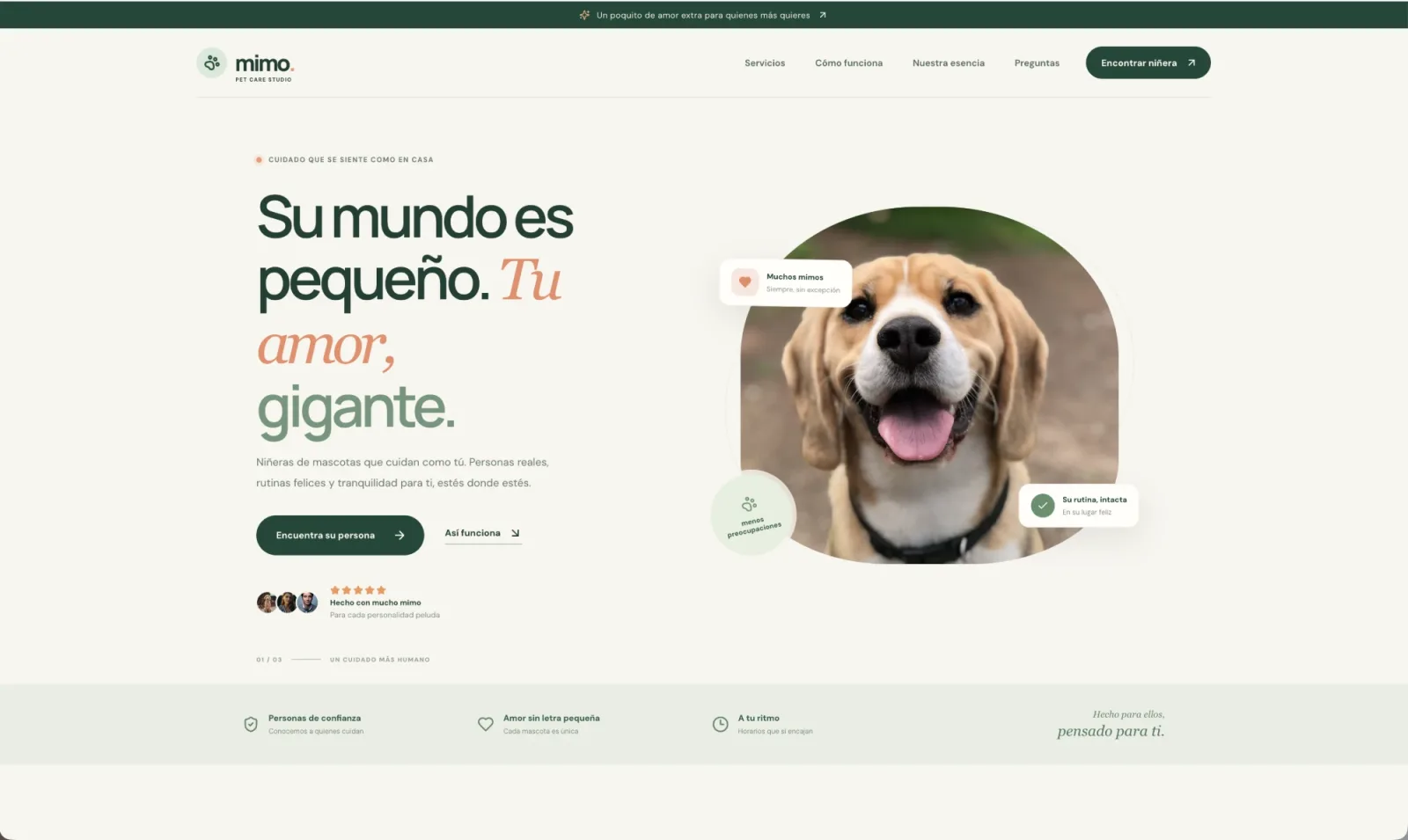
Yes. ChatGPT Free and Go can now create a custom MCP server, and the steps are the same. ALL’s creator tested it: on ChatGPT Free, ALL built a complete website with animations, and the limit stayed at 100%. ALL was also connected from a Go account, and it worked perfectly. The steps are in the guide. Tip for ChatGPT Free: do not attach files or images to the chat yourself. Free limits chats that include files or images and can pause them for a few hours (“Chat paused…”); that limit is OpenAI’s, not ALL’s. If it happens, open a new text-only chat and keep going: ALL works the same. Let ALL work directly with the files on your computer.
What exactly am I buying?
A license for ALL, the app that connects your ChatGPT to your projects, files and apps. Install it, authorize the connection and give orders from the chat you already use.
Can I try it before paying?
Yes: 3 free hours, no card, on one computer. Sign up with your email, install, and when the installer asks for your license link, type the email and the 6-digit code. The 3 hours start when the installer registers your computer, right after you type the code, early in the installation; they do not start when you sign up.
What happens when the 3 hours end?
ALL stops responding to ChatGPT and, right in the chat, shows you the three plans and a link to choose one. Your work and files are untouched. If you choose a plan, ALL reactivates by itself within about 5 minutes on the same computer, no reinstall.
Why only one trial per person and per computer?
Because it is a trial, not a free plan. We verify the email with a code and remember the computer with a hashed fingerprint, so the trial is the same for everyone. To know whether a trial was already used we keep only keyed hashes of the email and the computer; the email itself is deleted 30 days after the trial ends if you do not buy. Plans include up to 3 computers.
What do I do if the chat fills up?
Every ChatGPT conversation has a context limit. OpenAI handles that, not ALL. When it happens, open a new conversation and keep going. Tip: before you switch, ask the previous chat: “Create a handoff.md with what we did and what is left.” In the new chat say “Read handoff.md and continue”: ALL keeps it on your computer and the new chat continues where it left off.
Several repos at once, seriously?
Seriously. Builds, tests and processes in separate folders, running in parallel. You review everything from the chat. The real limit is your computer.
Three computers or three projects?
Three computers. As many projects as you want on each. A virtual machine counts as a computer.
Can I pay just once?
Yes. Lifetime ($19.99) keeps this version yours forever. Lifetime + Updates ($39.99) includes every new version: it equals 10 months of the monthly plan and after that you pay nothing more.
Do I still need the license link?
The link keeps working. But now you can also activate ALL with your purchase email and a 6-digit code that arrives in your inbox. Handy when you are at another computer and don’t have the link at hand.
Does everything stay on my computer?
Actions run on your computer. What ALL returns to the chat (results, excerpts, screenshots) goes to ChatGPT. Some diagnostic and vision features use external services. Read Privacy before sharing sensitive data.
Can this website’s chat use my computer?
No. Robi only answers questions. Work starts after you install ALL and connect it to ChatGPT.
Where do I pause my membership?
Open your account and sign in with the email you used to buy ALL. Monthly plans can be paused or resumed there. Pausing stops the next charges and turns ALL off until you resume. One-time purchases do not renew. If you have not chosen a password, use Forgot your password on that page.
What if I want to remove it?
Download the uninstaller for your system: Windows, macOS or Linux (on Linux: sh ALL-Uninstaller-Linux.run). Or from a terminal: curl -fsSL https://all-mcp.fyi/uninstall | sh (macOS, Linux) or irm https://all-mcp.fyi/uninstall.ps1 | iex (Windows PowerShell). It stops ALL, removes its services, files and the Super Admin helper (the one you approve at install, for the tasks that need administrator permission), and frees that seat on your license. Then delete ALL in ChatGPT at chatgpt.com/plugins.
 ALL
ALL